

Glucose Guardian provides estimates only and does not replace medical advice. Always follow your doctor’s instructions.
Glucose Guardian · Version 1.0

{{hero.title}}

{{hero.sub}}

{{hero.body}}

iPhone beta available now on TestFlight. App Store and Google Play coming soon.

Caregiver codes

It takes a village. Now the village has an app.

For everyone else — grandparents, babysitters, teachers, school nurses — create a caregiver code. No account needed: they type it or scan its QR on the sign‑in screen.

Permissions.

Readings, logs, adding logs, the calculator, chat — on or off, per person.

Schedules.

Always on, school hours, one‑time, or paused. Outside the window, the screen locks.

School nurse view.

One account lists every child a nurse cares for, each with their current reading.

Share in seconds.

Send a code by text or show its QR. Retire it any time.

Before: five different things.
After: one Glucose Guardian.

Before · five apps, a group text, and a laminated chart
CGM app
156 ↗
Notes
carb ratio 1:15… breakfast 1:12?? correction 1:50 — ask Dr. R
{{p.groupName}}
{{p.t1}}
{{p.t2}}
{{p.t3}}
Missed call (2)
{{p.missed}}
Carb chart (laminated)
Apple25 g
Waffle16 g
Milk, 1 cup12 g
IMG_4471.PNG
{{p.shot}}
After · what Glucose Guardian does
✓Readings — live from Dexcom, for everyone you choose
✓Meals and doses — logged once, with who gave them
✓The math — shown line by line, every time
✓{{p.row4b}} {{p.row4}}
✓The doctor — linked, and every change needs your approval
✓Alerts — to you first, then your backup
A day with Glucose Guardian

{{dayHead}}

Tap through a real day.

Try it

Snap it. Log it. Done.

No carb charts. No mental math. Take a picture of the plate — Glucose Guardian estimates the carbs, fills in the calculator with the live reading, shows every step of the math, and logs it for everyone.

  1. {{ss.n}}{{ss.label}}
Pick a plate
{{snap.nextHint}}
Trend

Packaged food? Switch to Barcode. Regulars are one tap away in Quick Lookup, and a forgotten meal can be backdated. Demonstration with sample settings (1:15 carb ratio · target 120 · correction 1:50) — not for real dosing decisions.

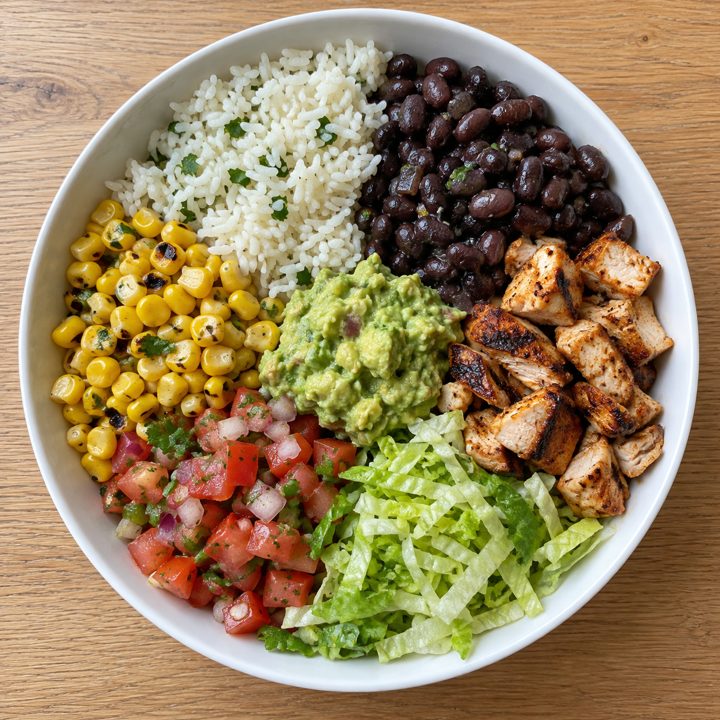
Camera view: two toaster waffles with blueberries and strawberries Camera view: spaghetti and meatballs with parmesan Camera view: burrito bowl with rice, black beans, chicken, corn, pico de gallo, lettuce, and guacamole
Hold a barcode inside the box
Estimating carbs…
Cancel
Glucose trend: {{fa.trend}}
{{fa.bg}} mg/dL
{{fa.arrow}}
{{fa.range}}
{{fa.alt}}
AI Photo AnalysisSave to Quick Lookup×
{{fa.title}}{{fa.portion}}● {{fa.conf}}
{{fa.carbs}}g carbstap to edit
{{fa.macros}}
High fat/protein meals digest slowly — glucose can keep rising 3–4 hours after eating. Recheck in about 2 hours; a delayed rise may need a small follow-up correction.
Log This Meal
Glucose
Insulin
Food
Chat
Dashboard
Dose
Log
{{calc.bg}} mg/dL
{{calc.arrow}}
{{calc.rangeLabel}}
CalculatorInsulin: Lispro ⌄
CARBS
{{calc.carbs}} g
from the photo
CURRENT BG LIVE
{{calc.bg}} mg/dL
⚠ {{calc.warnText}}
HOW YOUR DOSE IS CALCULATED
Correct BG
{{calc.corrU}}
{{calc.bg}} mg/dL
+
Carb Dose
{{calc.carbU}}
{{calc.carbs}} g
+
Active Carbs
0 u
0 g
−
Active Insulin
0 u
0 u
SUGGESTED DOSE
MANUAL
{{calc.shownDose}} units
{{calc.doseSub}}
Glucose
Insulin
Food
Chat
Dashboard
‹Today›
{{r.time}}{{r.title}}{{r.tag}}{{r.sub}}›
Glucose
Insulin
Food
Chat
Dashboard
Built‑in safeguards

Careful by design.

The calculator follows the same principles as commercial bolus calculators — and adds guardrails for the moments when families are most likely to make a mistake.

No dose stacking.

For a while after a dose, any extra correction is held — so reopening the calculator ten minutes later won’t suggest more. Carbs are always covered.

A ceiling on every suggestion.

Each suggestion is capped based on body weight. If the math goes past it, the app says so and asks you to check with your care team.

Lows come first.

When glucose is low, the app points you to fast‑acting carbs. Below target, the correction is left out.

Plain‑language warnings.

Very high? Verify with a finger stick and check ketones. Earlier insulin not working? Check the site or pen.

Learns, never overrides.

If your logged doses consistently differ from suggestions, a small pattern adjustment appears as its own line. Your settings never change on their own.

Basal is its own thing.

Long‑acting insulin isn’t dosed from carbs. Glucose Guardian keeps meal math and basal doses separate.

Chat and messages

{{p.msgHead}}

{{p.msgLede}}

{{p.dayTitle}}{{p.dayRange}}
{{p.st1}}
in range
{{p.st2}}
lowest
{{p.st3}}
highest
{{p.st4}}
given
{{dl.t}}
{{dl.by}}
{{dl.time}}

{{p.msgNote}}

Get the highlights.

Dexcom

Live from Dexcom.

Readings sync on their own, with trend arrows and color‑coded ranges — and the connection quietly signs itself back in so the numbers keep coming.

0.5 + 2.5 = 3.0 u

The dose, with the math shown.

Correction, carbs, active carbs, and active insulin each get their own line — so you understand the suggestion before you act on it.

Photo. Barcode. Done.

Snap the plate for an AI carb estimate, or scan a package’s barcode. Your go‑to foods stay a tap away.

Why the spike after lunch?
Three of the last five lunches…

Insights you can ask about.

The app spots patterns — meal spikes, dose timing, time in range — and every insight has an “Ask AI about this” button.

M
D
G
Dr

One care circle.

Co‑guardians get full access. Grandparents, sitters, and school nurses get a code — no account needed — with only the permissions and hours you choose.

Alerts that break through.

Highs, lows, and fast rises or drops — with urgent readings delivered as critical alerts, even on silent.

Four simple steps

How it Works

1

Connect Dexcom.

Sign in with Dexcom once. Readings flow in, with the latest always on the home screen.

2

Enter your care plan.

Add the carb ratio, target, and correction factor from your doctor, and the insulins you use.

3

Log, review, decide.

Snap the meal, see the suggested dose and every part of it, then log what you gave with one tap.

4

Bring everyone in.

Invite co‑guardians, hand out caregiver codes, and link the doctor’s office.

Insulin settings

Your doctor’s plan, built in.

Enter the carb ratio, target, and correction factor from your care team once. Every estimate uses them, and everyone in the care circle sees the same numbers.

—Different ratios for breakfast, lunch, dinner, or overnight
—Rapid, short, intermediate, long, ultra‑long, and pre‑mixed insulins — including U‑300 — each handled the right way
—Only the primary guardian can change settings — no surprise edits
—When the doctor suggests a change, nothing updates until you approve it
Every insulin type, ready to pick
RAPID‑ACTING
Humalog
Lispro Junior
NovoLog
Apidra
FIASP
LONG‑ACTING
Lantus
Basaglar
Levemir
ULTRA‑LONG
Toujeo
Tresiba
SHORT‑ACTING
Humulin R
Novolin R
INTERMEDIATE
Humulin N
Novolin N
PRE‑MIXED
Humalog Mix 75/25
NovoLog Mix 70/30
Child View

Grows up with them.

Give your child their own view on their own phone — big, friendly, and simple. Settings stay locked behind your guardian PIN, and everything they log shows up on yours.

Mia’s view
Your view
Co‑guardians

{{p.cgHead}}

{{p.cgLede}}

{{p.cgA}}
{{p.cgB}}
Who can do what
Permission
{{p.roleOwner}}
The main account
Co‑guardian
Up to 3 · their own account
Caregiver code
No account · just a code
{{r.label}} {{r.v1}} {{r.v2}} {{r.v3}}
Alerts

The right alert. To the right person. Right away.

Turn on exactly the alerts you want — high, low, rising fast, falling fast — and set your own thresholds. Urgent readings come through as critical alerts, so they sound even when the phone is on silent.

50 alert sounds.

A different sound for highs and lows, so you know which without looking.

Caregivers in the loop.

When a reading turns urgent, you get a moment to answer “I’m OK” or “Alert them now” before your backup is paged.

A failsafe that never waits.

For the most extreme readings, caregivers are alerted immediately — no waiting window.

No alert spam.

Built‑in cooldowns keep one long high from buzzing every five minutes.

7:42
{{al.title}}now
{{al.body}}
{{al.meta}}
{{p.note2}}6m ago
84 mg/dL ↓↓
{{p.note3}}2h ago
Turkey sandwich · 32 g carbs
For doctors and care teams

The doctor’s office, finally on the same page.

Share a Doctor Code and your clinic sees what you see — in a web portal built for the people who manage many patients at once.

See how the portal works ›

A portal for every linked patient.

Readings, food and insulin logs, meal photos, and A1C estimates in one place.

Alerts for the clinic, too.

Urgent lows and highs, and readings that stop arriving, show up in the portal — with email alerts and a weekly patient digest.

Changes you approve.

A doctor can propose new ratios or targets. Nothing changes until a guardian reviews and approves it in the app.

Messaging built in.

Families and the care team can message right inside the app.

Reports for the visit.

Export a PDF or text report with 3‑, 7‑, 14‑, 30‑, and 90‑day A1C estimates.

Light and dark mode

Easy on the eyes.
At 2 p.m. or 2 a.m.

Follow your phone automatically, or pick Light or Dark — so a middle‑of‑the‑night check won’t light up the whole room. Switching here changes every screen on this page.

What’s new

New in version 1.0.

The latest beta updates, straight from the build.

New

Stay signed in to Dexcom

The Dexcom connection quietly signs back in, so readings don’t stop overnight.

New

No‑stacking hold

Right after a dose, extra corrections wait until that insulin has had time to work.

Improved

Smarter insulin on board

A more realistic insulin curve, credited only against corrections — never the meal itself.

New

Barcode scanning

Switch the food camera to Barcode for packaged snacks.

Improved

A1C reports by day

3‑, 7‑, 14‑, 30‑, and 90‑day estimates in exports and on the dashboard.

Improved

Guardian PIN everywhere

Your PIN now follows you to a new phone or after reinstalling.

New

Help Mode

A guided tour that spotlights each control and explains what it does.

New

Update prompts

When a new version is ready, the app tells you — just tap restart.

Why we built it

Two founders. One reason.

[One or two sentences on how you two came together to build Glucose Guardian.]

[Founder 1 photo]
“[Your story — when your child was diagnosed, the night or the handoff that made you build this, and what you want other families to feel.]”
— Brian Bethea, co‑founder
[Founder 2 photo]
“[Your partner’s story — their connection to diabetes and why they joined you to build this.]”
— Brett Hoffman, co‑founder

From families in the beta.

“[Quote from a beta parent]”
[Name], parent of a [age]‑year‑old with Type 1
“[Quote from an adult with Type 1]”
[Name], living with Type 1 for [years] years
“[Quote from a school nurse]”
[Name], school nurse
“[Quote from an endocrinologist or diabetes educator]”
[Name, credentials, practice]

Designed for real life.

Transparent by design.

Every suggestion shows its parts. You always see why, and you always make the call.

Your care team stays in charge.

Ratios and targets come from your doctor. Glucose Guardian provides estimates — it never replaces medical advice.

Your data, your family.

[YOUR PRIVACY COMMITMENT — how data is stored, who can see it, and how to delete it.]

Questions? Answers.

What is Glucose Guardian?

An app for families and people managing diabetes. It shows live Dexcom readings, estimates carbs from photos, barcodes, or search, suggests insulin doses with the math laid out, sends alerts, and keeps co‑guardians, caregivers, the school nurse, and the doctor on the same page.

Which glucose monitors does it work with?

Dexcom, through Dexcom Share. Sign in once and readings sync automatically. [OTHER CGMS — COMING LATER?]

What’s the difference between a co‑guardian and a caregiver?

Co‑guardians have their own account and full access — they can log, fix, and dose from anywhere. Caregivers use a code with no account, and only get the permissions and hours you choose.

Does a babysitter or teacher need an account?

No. Create a caregiver code, choose what they can see and do and when, and share it by text or QR. They enter it on the sign‑in screen. Retire it any time.

Who can change insulin settings?

Only the primary guardian. Doctors can propose changes from the portal, but nothing changes until a guardian approves it.

Does it replace my doctor or care team?

No. Glucose Guardian provides estimates only and does not replace medical advice. Always follow your doctor’s instructions.

Is it available on Android?

[ANDROID AVAILABILITY AND DATE.]

How much does it cost?

[PRICING DETAILS.]

How do I join the beta?

Glucose Guardian is in beta on TestFlight for iPhone. Install Apple’s TestFlight app, then tap here to join the beta.

Be first in line.

Join the beta on iPhone today, or get a note the moment Glucose Guardian arrives on Android.

Glucose Guardian for Schools and Organizations

Every student.
One screen.

Built for school nurses, teachers, aides, and camp staff.

A Caregiver account shows every student you look after — their live reading, the carbs and insulin still working, and the full view whenever their family allows it. No more calling home to ask for a number.

Already in the health office

What school nurses reach for most.

[Two school nurses at our daughter’s school use Glucose Guardian every day.] These are the features they told us they can’t do without.

Recent readings, at a tap.

Tap the glucose circle to see every reading before you walked in — so you’re never starting from a single number.

The whole day, including home.

The log shows breakfast at home, what was given, and who gave it. Flip back a day to see how things have been going.

Fix a mistake in seconds.

Typed 20 instead of 2.0? Open the entry, edit it, and save. It’s marked “Edited,” so the family sees exactly what changed.

Snap lunch. The math is done.

Take a photo of the tray. Carbs are estimated and the insulin is calculated from the family’s own settings — every step shown.

Every student on one list.

The Caregiver Menu shows each student’s reading and the carbs and insulin still working — tap one to open their dashboard.

On the health office iPad.

The same app runs on iPhone, Android, and iPad — including the iPad most schools already have.

“[Quote from school nurse #1]”
[Name], school nurse, [School]
“[Quote from school nurse #2]”
[Name], school nurse, [School]
Getting started

Ready before the first bell.

1

Choose “Caregiver.”

Download the app and pick Caregiver at sign‑up — for a nurse, teacher, or aide watching over one or more kids.

2

Add your organization.

Your name and, if you like, your school or clinic. No child profile, CGM, or dosing setup.

3

Add each student.

Each family shares an 8‑character access code from their Care Circle. Type it or scan its QR.

4

Tap in when needed.

Open a student for their readings, logs, and chat — then come back to your list.

Families stay in charge

Exactly the access each family chooses.

Every student’s code carries its own permissions and schedule, set by their guardian. You never see more than they’ve shared.

Permissions, per student.

View readings, view logs, add logs, use the calculator, and chat — each one on or off.

School hours, automatically.

A code can follow a weekly schedule. Outside it, that student shows “Locked” on your menu — no data, nothing to remember.

Every log is signed.

Meals and doses you add show “by School nurse,” so families see exactly who gave what, and when.

Message the family.

Each student’s chat keeps the family — and their care team — in the same thread, during your hours.

Live, not a snapshot.

New readings, opened or closed windows, and retired codes show up on your list the moment they change.

Easy to tidy up.

When a student moves on, remove them from your list. The family can add you back with a new code anytime.

Questions from schools.

Does each nurse need their own account?

Yes. Each nurse, teacher, or aide signs up as a Caregiver and adds the students they look after.

Where do the access codes come from?

From each student’s guardian, in the Care Circle section of their Dashboard. Codes are 8 characters and can be shared by text or QR.

Can a nurse change a student’s insulin settings?

No. Insulin settings belong to the primary guardian. A nurse can use the calculator only if the family allows it.

What happens after school hours?

If the family set a schedule, the student shows as Locked on your menu until the next window opens.

Does it replace our school’s diabetes care plan?

No. Glucose Guardian provides estimates only and does not replace medical advice or the student’s care plan.

What does it cost for schools?

[PRICING FOR SCHOOLS AND ORGANIZATIONS.]

Bring it to your school.

Tell us about your school, district, camp, or clinic and we’ll help you get your staff set up.

Glucose GuardianSee the whole story — for families and for anyone managing their own diabetes.Walk through a day with the app: live readings, snapping a meal, the dose math, and the care circle.
Back to Glucose Guardian ›
Glucose Guardian for Clinicians

The whole picture.
Between visits.

Your patients’ glucose, insulin, and meals in one place.

The Diabetes Care Portal shows what families log in Glucose Guardian — every reading, meal, and dose, and who gave it — so you can spot patterns, message the family, and propose changes they approve in the app.

Try it yourself

Walk through the real portal.

No screenshots — open the actual portal in demo mode and click around. It’s loaded with five made‑up patients, needs no account, and saves nothing.

  1. 1Open the portal. It opens in a new tab.
  2. 2Choose “Try the demo.” You’ll land on a sample patient list, sorted by urgency.
  3. 3Open a patient, then “Take a Tour.” A guided walkthrough spotlights each part of the portal, one step at a time.
Private by design

Easy to find. Closed to everyone else.

Anyone can read about the portal here. Only invited clinicians can sign in — and they only see the patients whose families linked them.

A key to get in.

Accounts start with a license key or invite code from your organization’s administrator. A license key sets up your organization.

Families choose who’s linked.

A patient appears only after the family shares a Doctor Code from their Glucose Guardian app and you enter it.

A demo with nothing real.

“Try the demo” opens the portal with five sample patients. No account needed, and nothing is saved or sent anywhere.

Built for a full panel of patients.

Sorted by urgency.

Your patient list puts who needs you first, with an “Attention needed” strip for changes awaiting a caregiver or just approved.

Your patient at a glance.

Current glucose, estimated A1C / GMI, time in range, insulin today, and the full CGM trace — on every screen.

Make the Overview yours.

Show or hide any card. The rest reflow, and cards open deeper tools like full trends.

Trends from 3 days to a year.

See whether control is improving or slipping, with plain‑language insights on what’s driving the A1C.

Every meal, dose, and response.

Pick any day: carbs, insulin given, glucose before and after, and who logged it — parent or school nurse.

Clinical flags.

Post‑meal highs and possible under‑boluses are called out, so patterns don’t hide in the data.

Propose, don’t override.

Suggest carb‑ratio and correction changes and compare periods. Nothing changes until the caregiver confirms in the app.

Message the care circle.

Chat with parents — and the school nurse — right from the patient’s chart.

Ask about a patient.

A built‑in assistant answers questions about the patient you’re viewing, from their own data.

How it connects

From the family’s phone to your portal.

1

Get your key.

Your organization’s administrator gives you a license key or invite code.

2

Link a patient.

The family shares a Doctor Code from the Glucose Guardian app. Enter it, and they’re on your list.

3

Review and message.

See readings, meals, and doses as they’re logged, and message the family.

4

Propose a change.

The family reviews it in the app. It takes effect only after they approve.

Questions from clinicians.

Who can sign in to the portal?

Clinicians with a license key or invite code from their organization. The demo is open to anyone, but it only contains made‑up sample patients.

How do I add a patient?

The family shares a Doctor Code from their Glucose Guardian app. You enter it in the portal and the patient appears on your list.

Can I change a patient’s settings?

You can propose carb‑ratio, correction, and target changes. They take effect only after the caregiver confirms in the app.

Can I message the school nurse?

Yes — parents and caregivers tagged as School Nurse in the care circle can be messaged from the patient’s chart.

Does it replace clinical judgment?

No. Glucose Guardian provides estimates and summaries only and does not replace medical advice.

What does it cost for a practice?

[PRICING FOR CLINICS AND ORGANIZATIONS.]

Bring it to your practice.

Request a license key for your clinic, or open the portal and try the demo with sample patients.

Glucose GuardianSee the whole story — for families and for anyone managing their own diabetes.Walk through a day with the app: live readings, snapping a meal, the dose math, and the care circle.
Back to Glucose Guardian ›